
razjs
v1.3.0
Published
JS-version of the Razor-Express library (Razor-like template engine for NodeJS Express).

Maintainers
 develax
Readme
RazJS
JavaScript (browser) version of the Razor-Express (RAZ) view template engine library.
Note: debugging information of runtime code errors in the JS version is more stingy because the NodeJS virtual machine is not used in the browser.
Examples
Example 1: rendering HTML with Razor syntax
HTML:
<script src="node_modules/razjs/raz.js"></script>
<div id="target">
</div>
JavaScript:
const countries = [
 { name: "Russia", area: 17098242 },
 { name: "Canada", area: 9984670 },
 { name: "United States", area: 9826675 },
 { name: "China", area: 9596960 },
 { name: "Brazil", area: 8514877 },
 { name: "Australia", area: 7741220 },
 { name: "India", area: 3287263 }
];

const template = `
<table>
  <tr>
    <th>Country</th>
    <th>Area sq.km</th>
  </tr>
  @for(var i = 0; i < Model.length; i++){
    var country = Model[i];
    <tr>
      <td>@country.name</td>
      <td>@country.area</td>
    </tr>
  }
</table>`;

const html = raz.render(template, countries);
document.getElementById("target").innerHTML = html;
HTML output:
^ Try it on jsfiddle.net
Example 2: handling and displaying errors
HTML:
<script src="node_modules/razjs/raz.js"></script>
<div id="target">
</div>
JavaScript:
window.addEventListener('error', function (e) {
    setTimeout(() => {
        // The document have to be fully loaded before replacing its whole content - that's why we use timer.
        document.documentElement.innerHTML = (e.error.isRazorError) ? e.error.html() : e.error.toString();
    }, 0);
    e.preventDefault(); // Stop propagating since we've handled it.
});

const model = 1;
const template = "<div>@Model</span>";
const html = raz.render(template, model);
document.getElementById("target").innerHTML = html;
Rendered HTML:
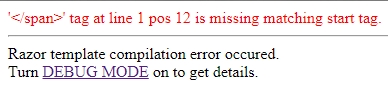
The error information displayed above is quite stingy. To get more details turn debug mode on:
raz.debug = true;...and refresh the browser page:
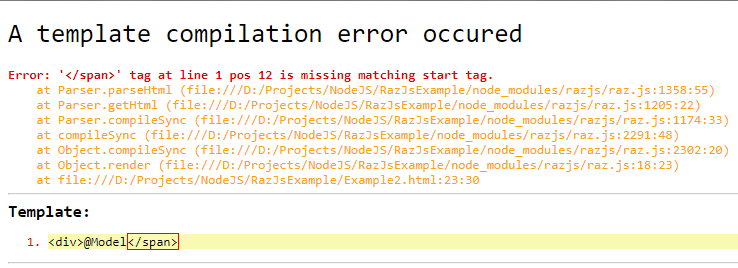
^ This code is available in the RazJsExample repository.
Example 3 (the entire HTML-page with embedded JavaScript)
<!DOCTYPE html>
<html lang="en">

<head>
    <meta charset="UTF-8">
    <meta name="viewport" content="width=device-width, initial-scale=1.0">
    <meta http-equiv="X-UA-Compatible" content="ie=edge">
    <title>RazJS library test - #1</title>
    <style>
        pre {
            background-color:black;
            color:#f3eeb5;
            padding: 0 0.5rem;
            border: 1rem ridge #ababab;
        }
    </style>
    <script src="node_modules/razjs/raz.js"></script>
    <script type="text/javascript">
        function test() {
            var template = `
<h1>@Model.title</h1>
<strong>Days of the week:</strong>
<ul>
    @for (var i = 0; i < Model.days.length; i++) {
        <li>@Model.days[i]</li>
    }
</ul>
<div>Today is <i>@Model.today()</i>.</div>
<br />
<hr />
<div>
    <h2>The Razor-syntax template used in this example</h2>
    <pre>
        @Model.template
    </pre>
</div>`;
            var model = {
                title: document.title,
                day: new Date().getDay(),
                days: ["Sunday", "Monday", "Tuesday", "Wednesday", "Thursday", "Friday", "Saturday"],
                today: function () {
                    return this.days[this.day];
                },
                template
            }
            document.body.insertAdjacentHTML('afterbegin', raz.render(template, model));
        }
    </script>
</head>

<body onload="test()">
</body>

</html>
HTML output:
Days of the week:
- Sunday
- Monday
- Tuesday
- Wednesday
- Thursday
- Friday
- Saturday
Today is Thursday.
^ Try it on jsfiddle.net or the RazJsExample repository.
More syntax construction examples on Razor-Express syntax reference for NodeJS & Express.