
leaflet.smoothgeodesic
v1.1.0
Published
Smooth geodesic curves for Leaflet.

Maintainers
 hunter547
Readme
🌎 Leaflet.SmoothGeodesic

Demo
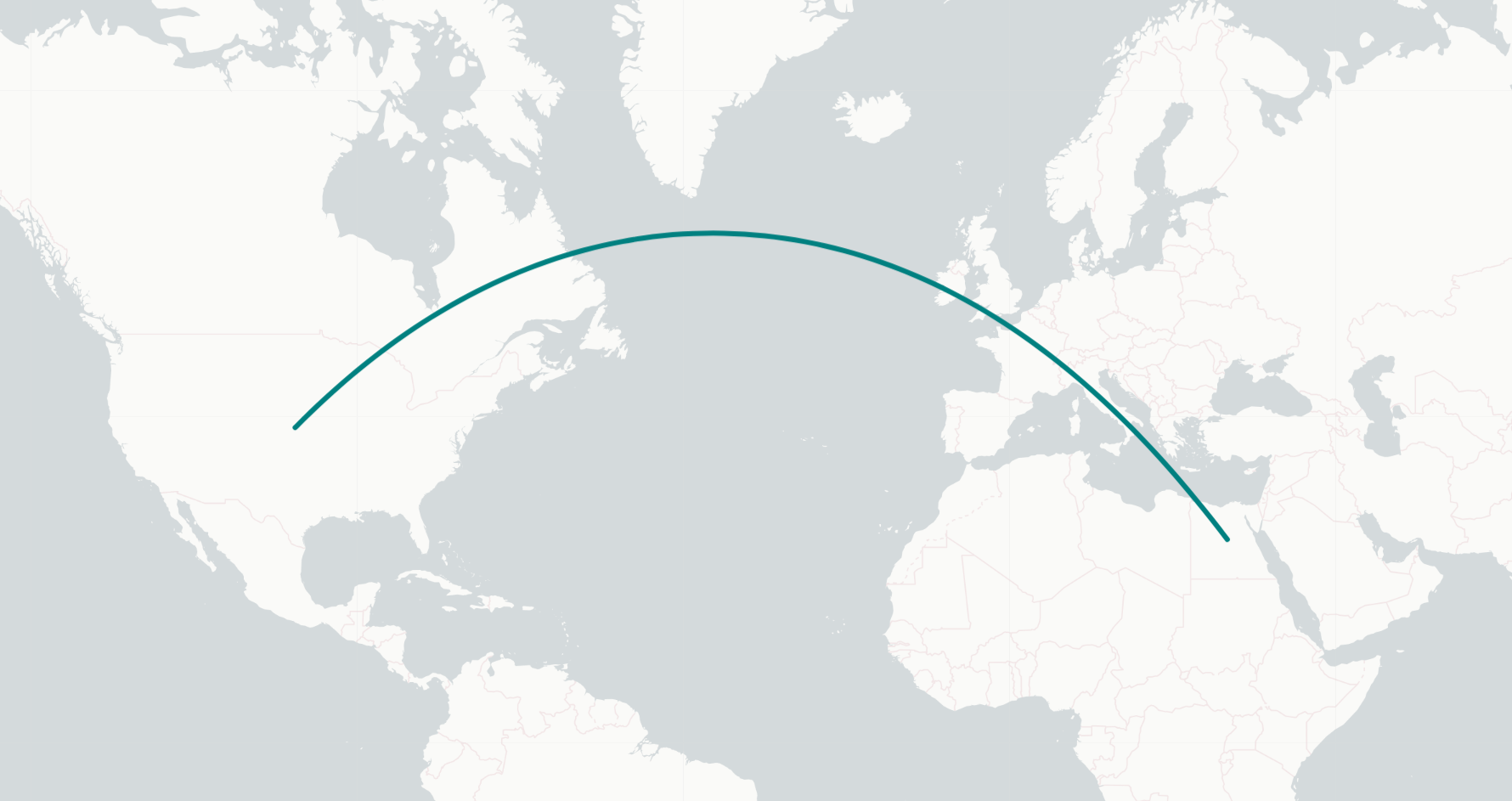
Purpose
Draw smooth geodesic (Great Circle) paths from a source latitude/longitude to a destination latitude/longitude.
Built With
Getting Started
Setup
You need to have a leaflet map setup before usage. Follow the setup guide here: Vanilla Javasciprt: https://leafletjs.com/SlavaUkraini/examples/quick-start/ React: https://react-leaflet.js.org/docs/start-installation/
Installation
Node.js
npm i leaflet.smoothgeodesicImport leaflet FIRST, then leaflet.smoothgeodesic:
import L from "leaflet"; // import { smoothGeodesic, SmoothGeodesic } from 'leaflet'; // for TypeScript
import "leaflet.smoothgeodesic";
Usage
Give a source coordinate and destination coordinate (with options) and optionally animate it.
Parameters
L.smoothGeodesic(Source coordinates, Destination coordinates, Number of midpoints, Options)Source coordinates
Destination coordinates
Number of midpoints
Options
{
	"weight": 4,
	"color": "darkslateblue",
	"animate": { "duration": 3000, "delay": 1000 }
}
Examples
L.smoothGeodesic(
	[40, -99], // <- Source coordinates
	[27, 30], // <- Destination coordinates
	65, // <- Number of midpoint calculations
	{
		weight: 4,
		color: "teal",
		animate: 3000,
	} // <- Options
).addTo(map); // map is an instance of L.Map

////////////////////////////////////////////////////////

new L.SmoothGeodesic(L.latLng(60, 100), L.latLng(40, -4), 65, {
	className: "customPathClass",
	animate: {
		duration: 3000,
		delay: 3000,
	},
}).addTo(map);

////////////////////////////////////////////////////////

L.smoothGeodesic(new L.LatLng(24, -76), new L.LatLng(31, 36), 100, {
	opacity: 0.5,
	lineCap: "square",
	dashArray: "4 1",
}).addTo(map);
Crossing the antimeridian
Some shortest paths cross the antimeridian (the ±180° meridian) — for example a trans-Pacific route from North America to Asia or Oceania. These are drawn the exact same way as any other path; no extra options are required:
L.smoothGeodesic(
	[38.8339, -104.8214], // <- Colorado Springs, USA
	[35.6762, 139.6503], // <- Tokyo, Japan (path crosses the Pacific antimeridian)
	65,
	{
		weight: 4,
		color: "orange",
		animate: 3000,
	}
).addTo(map);
The curve is rendered as one continuous line that carries on past ±180° into the adjacent world copy rather than stopping at the dateline, so it always finishes at the destination. Because the endpoint may land outside the [-180, 180] range (Tokyo above resolves to roughly -220° longitude), place any marker you add at the destination on the same world copy as the curve — i.e. shift its longitude by ±360° to match where the path ends.
Roadmap
- [x] Add Changelog.
- [x] Render antimeridian-crossing paths as one continuous curve to the destination.
- [ ] Add CDN delivery of the src code for vanilla javascript support.
- [ ] Add methods to allow setting of new source and destination coordinates on an existing path.
- [ ] Extend off the Leaflet Path class instead of extending using the extend method (better typing / more readable)
Contributing
Contributions are what make the open source community such an amazing place to learn, inspire, and create. Any contributions you make are greatly appreciated.
If you have a suggestion that would make this better, please fork the repo and create a pull request. You can also simply open an issue with the tag "enhancement". Don't forget to give the project a star! Thanks again!
- Fork the Project
- Create your Feature Branch (
git checkout -b feature/AmazingFeature) - Commit your Changes (
git commit -m 'Add some AmazingFeature') - Push to the Branch (
git push origin feature/AmazingFeature) - Open a Pull Request
License
Distributed under the MIT License. See LICENSE for more information.
Contact
Hunter Evanoff - [email protected]
Project Link: https://github.com/hunter547/Leaflet.SmoothGeodesic
Acknowledgments
This repo wouldn't be possible without the work of these repos:
- How to get under the hood of L.Path and customize it: Leaflet.curve
- Geodesic calculations: arc.js