
guidedao-code
v0.1.3
Published
Code Assistant
Downloads
18


Readme
GuideDAO Code
📋 Overview
GuideDAO Code is an intelligent CLI assistant for working with your codebase, designed to simplify development and maintenance processes. Using powerful LLM models, GuideDAO Code helps you analyze, modify, and understand code by responding to your natural language requests.
✨ Features
- 🔍 Code Analysis - explanation of complex parts of your codebase
- ✏️ File Modification - editing, creating, and deleting files based on requests
- 🔄 File Management - moving and renaming files
- 🐛 Error Fixing - analyzing and fixing browser errors
- 📚 Documentation - generating explanations and documentation
🚀 Installation
Global Installation
npm install -g guidedao-codeLocal Installation
npm install guidedao-code🖥️ Usage
Running via CLI
guidedao-codeThis will launch an interactive CLI interface in your current project directory.
Example Requests
After launching the CLI, you can enter natural language requests:
guidedao-code> Explain the project structureguidedao-code> Create a new utils/helpers.ts file with date utility functionsguidedao-code> Fix browser errors🛠️ Commands
GuideDAO Code supports the following commands:
| Command | Description | Example Usage |
| -------------------- | ------------------ | -------------------------------------------------------- |
| READ_FILE | Read file content | Show me the content of src/index.ts |
| EDIT_FILE | Edit a file | Add logging to the login function in auth.js |
| CREATE_FILE | Create a new file | Create a Button component in src/components/Button.tsx |
| DELETE_FILE | Delete a file | Delete the unused old-utils.js file |
| MOVE_FILE | Move/rename a file | Move auth.js to the services folder |
| EXPLAIN_FILE | Explain a file | Explain what webpack.config.js does |
| FIX_BROWSER_ERRORS | Fix browser errors | Fix errors in the browser console |
🏗️ Architecture
GuideDAO Code uses the following architecture:
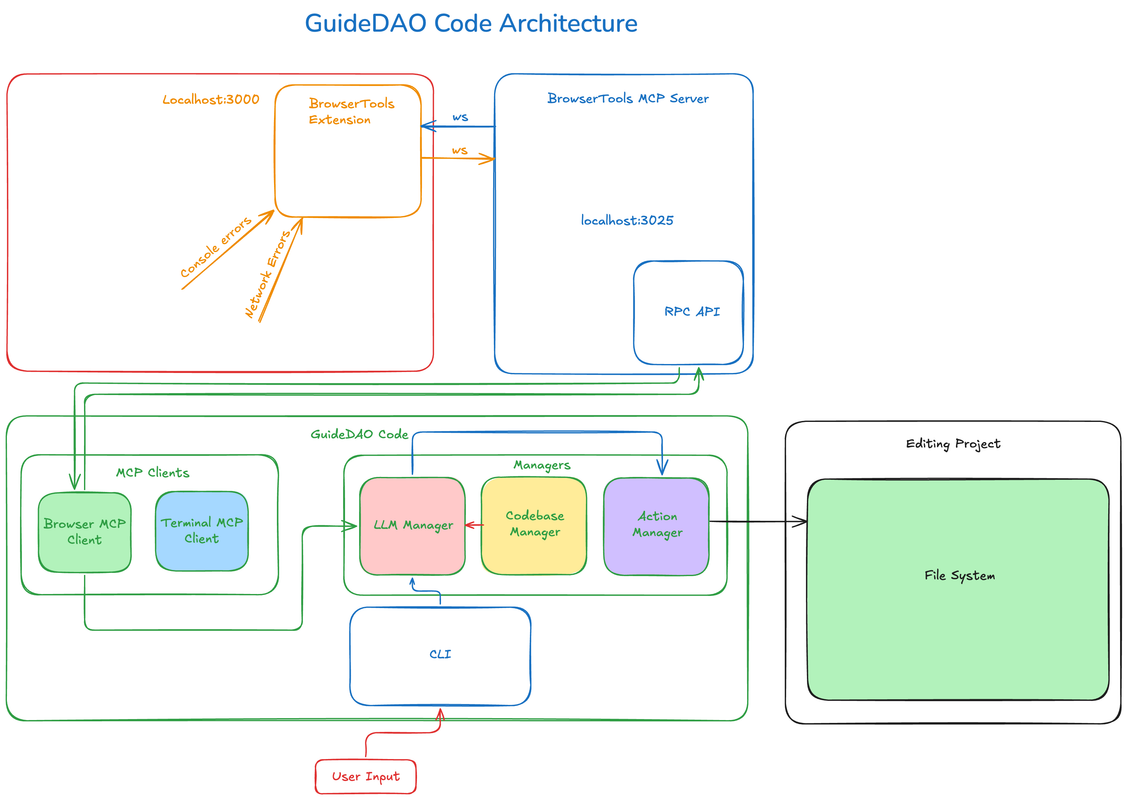
Key Components:
- CLI Interface - user interaction
- LLM Model - natural language processing and code generation
- Codebase Manager - scanning and managing project files
- Action Handlers - performing operations on files
🧩 Integrations
GuideDAO Code integrates with:
- 🌐 MCP Browser Client - for analyzing browser errors
- 🤖 Anthropic Claude - for natural language processing
- 🗄️ SQLite - for local data storage
💻 Development
Requirements
- Node.js 20+
- pnpm 9+
System Requirements
This package uses native modules (better-sqlite3) that require compilation during installation:
- macOS: Make sure you have Xcode or Command Line Tools installed
xcode-select --install - Linux: Ensure you have build tools and SQLite development libraries
# Ubuntu/Debian sudo apt-get install build-essential python3 libsqlite3-dev # RHEL/Fedora sudo dnf install gcc-c++ make python3 sqlite-devel - Windows: Install Visual Studio Build Tools and Python
npm install --global --production windows-build-tools
Installing Dependencies
pnpm installBuilding the Project
pnpm run buildRunning in Development Mode
pnpm run dev🔑 Configuration
To work with different LLM models, create a .env file in the project root:
ANTHROPIC_API_KEY=your-api-key🤝 Contributing
Contributions are welcome! To contribute:
- Fork the repository
- Create a branch for your changes
- Make changes and create a PR
📄 License
ISC