
geranium
v0.2.0
Published
mvvm typescript framework

Maintainers
 anete.anetes
Readme
Geranium
Modern conceptual MVVM framework is built on the principle of interchangeable modules.
Dependencies
It's full free of dependencies other packages. Can be used as npm-module from both server and client side, or a separate compiled js library. Truly, it can be used as separate ts files if you need only a part of full solution. It's free of ts-loader, or any other transpile technology (like Babel). Targeting to ES5 with ES6 modular-system.
Conceptual workflow
- Design your model filled with business-logic and nested components
- Mark up your View or multiple Views for this model
- Configure advanced features such as routing / validation / registration
TL;DR Example
//main application model

@routed("/application/start") //optional routing
export class App extends ViewModel {
    // constructor params may be routed
    constructor(routedParam1: string, routedParam2?: number) {
        super();
        //control of nested components initializing
        this.title = routedParam1;
        this.header.title = this.title;
        this.body.headerclone = this.header;
        this.body.btn = this.btns[0];
    }

    // nested components which can contains another components
    header: Header = new Header();
    body: Body = new Body();

    // self fields
    title: string;
    nowYear = (new Date()).getFullYear();
    btns: Array<CategoryButton> = [
        new CategoryButton("Btn1"),
        new CategoryButton("Btn2"),
        new CategoryButton("Btn3"),
    ];

    // optional changing current document title
    documentTitle() {
        return this.title;
    }

    // view provide method, can contains logic of screen size etc
    view(): string | Constructor<View> | Constructor<ViewDOM> {
        return AppView;
    }
}

// header component
class Header extends ViewModel {
    // view provide method can return three different view types
    view(): string | Constructor<View> | Constructor<ViewDOM> {
        return "<h1>[title]</h1>";
    }

    title: string;
}

// body component with clone of header
class Body extends ViewModel {
    view(): string | Constructor<View> | Constructor<ViewDOM> {
        return "<div>[headerclone][btn]</div>";
    }

    headerclone: Header;

    btn: CategoryButton;
}

// main application view will be attached to the body.app
class AppView extends ViewDOM {
    async DOM(): Promise<HTMLElement[]> {
        return [document.querySelector(".app")];
    }
}

// index.ts
import { App } from "./components/app";
import GeraniumApp from "../node_modules/geranium/runtime/concrete/App";

// you can change default implementations of functional framework components
GeraniumApp.start({});
new App("Demo title");
App model markup:
<!DOCTYPE html>
<html lang="en">

<head>
    <title>Demo</title>
</head>

<body class="app">
    [header]
    <div>[body]</div>
    <script src="./dist/bundle.js"></script>
</body>

</html>
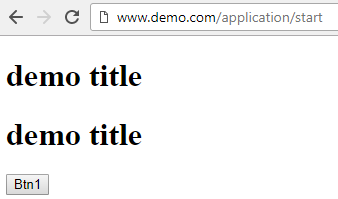
What does it look like:
Interchangeable modules
- ICoherenceContainer, IInjected: IoC container for types. Default container store components in memory.
- ILogger: component for additional logging of requests/view engine.
- IRequest, ICommunicator: server-side interaction interfaces, using for model/state auto-updates
- ITemplateEngine: template engine for your
Viewandstring-Viewrepresentations. By default it's empty, but you free for use any of them. - IValidationReporter: report your model-forms errors.
- IHistory: browser history provider for routing.
- IRouter: default router for application. By default, any of implementations will store collection of existed routes of all components.
- IStorage: you can store any data through container with this interface.
- IViewEngine: interface for proicessing all your
ViewModel.renderfunction. - IViewBinder: you can change default view model bind process.
- IBinding: concrete realizations of view model bindings.
- IViewPublisher: publish binded view for representation.
Main extendable components
- State - some objects which can be access and updates from any pieces of application
- Model - object representation of your UI.
- ViewState - state with UI representation.
- ViewModel - models with user interactions, a.k.a. forms.
Extension Points
The main extension point for your components it's Binding's and ViewRenderers. Bindings can be extended from IBinding<T> interface or Binding<T>/BaseBinding/BaseByAttributeBinding classes, rendereres can be extended from IViewRenderer interfaces. You can provide methods for searching needed elements in current DOM zone, bind your model for this DOM and clear template.
Example:
import { BaseByAttributeBinding } from "../../node_modules/geranium/binding/concrete/base/BaseByAttributeBinding";
import * as Mustache from "mustache";

export class MustacheBind extends BaseByAttributeBinding {
    attribute: string = "data-templating-content";
    async binding(DOMObject: HTMLElement, model: any) {
        const parsed = Mustache.render(DOMObject.innerHTML, model);
        DOMObject.innerHTML = parsed;
    }
}
After that, you will only need to register in the main application container - GeraniumApp:
import GeraniumApp from "../node_modules/geranium/runtime/concrete/App";
GeraniumApp.register(IBinding, new MustacheBind());
Other extension points:
Any of interchangeable modules can be extension point of your application. Functional capability can be differents, like: virtual dom view engine, JSX binding, SSR templating, e.t.c.
Roadmap (0.5.0)
- [x] PropertyBinding with inheritance components
- [x] HtmlView: representation of component that can be lazy loaded from server
- [ ] Two-way data-binding
- [ ] Communicator/Synchronizer layer restructuring
- [ ] Virtual DOM implementation of IViewPublisher
- [ ] JSX IViewRenderer
- [ ] TODO app demo
- [ ] Perfomance demo
- [ ] Docs