
flave
v1.5.3
Published
A Razor like View transpiler for JavaScript


Readme
Flave - Beta


Description
Flave was created to bring ASP.NET Razor to Node. Along the way some liberties on the implementation were made. While there is no shortage of very powerful templating engines that exist for JavaScript. There seems to be a very common theme of reducing/removing logic from the view. Flave isn't about that. In fact that's where Flave gets it's name. Flave stands for Full Logic Access View Engine. It aims to allow as much control of the markup and how it's generated, and because the views are all plain old JavaScript functions that return strings. There is no DOM needed. Which means that the functions are isomorphic, allowing you to create code that is usable server-side and client-side. Also because Flave transpiles to basic functions, if there is some sort of JavaScript functionality that isn't implemented you can always place it in a code block within the view. With that in mind there are things that it won't do. It won't bind events. It won't change states for you. It won't two way data bind. Those things are more of a WebForms thing.
Install
npm install flaveEditor Extensions
Preview
Flave
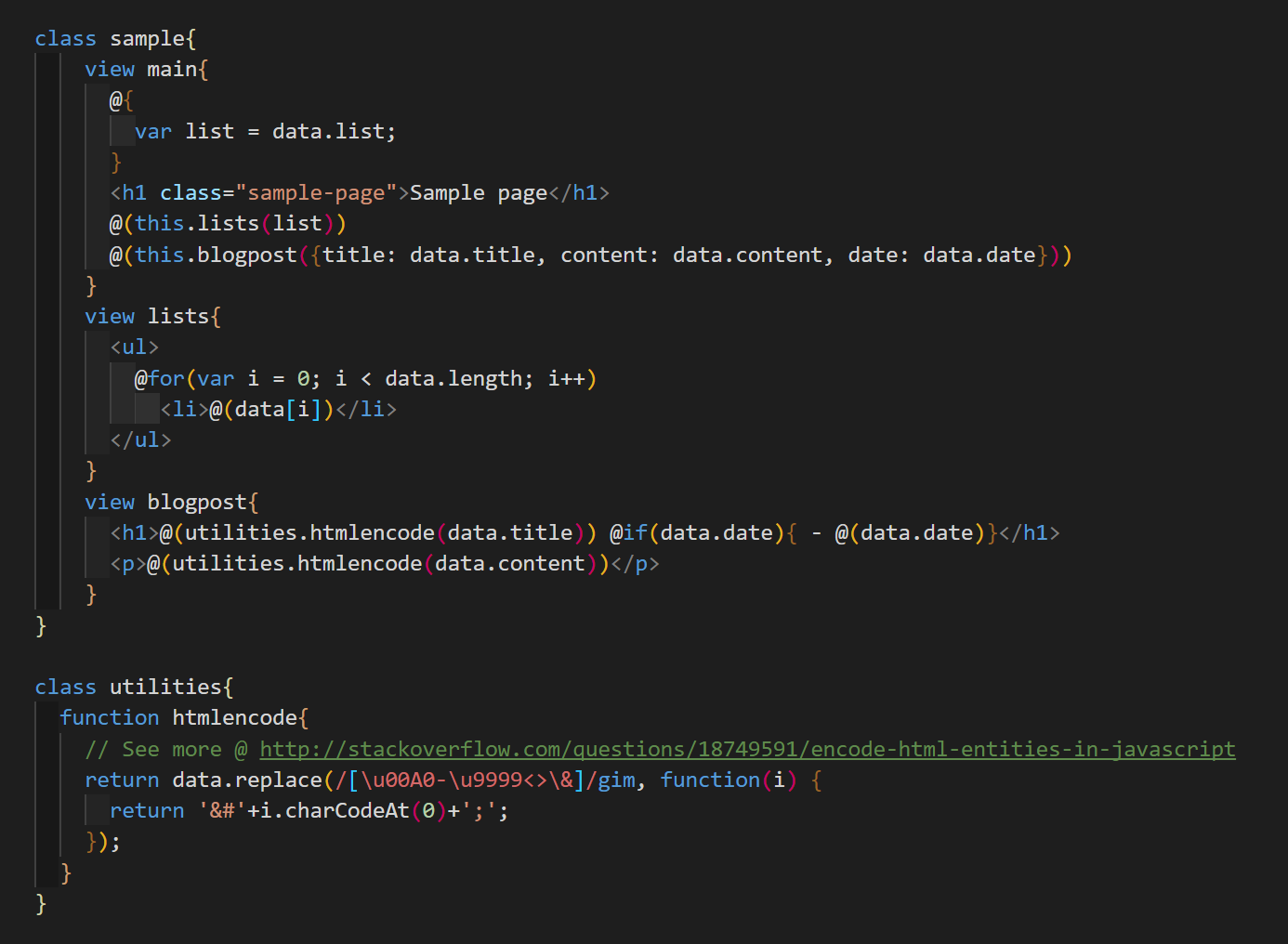
JavaScript
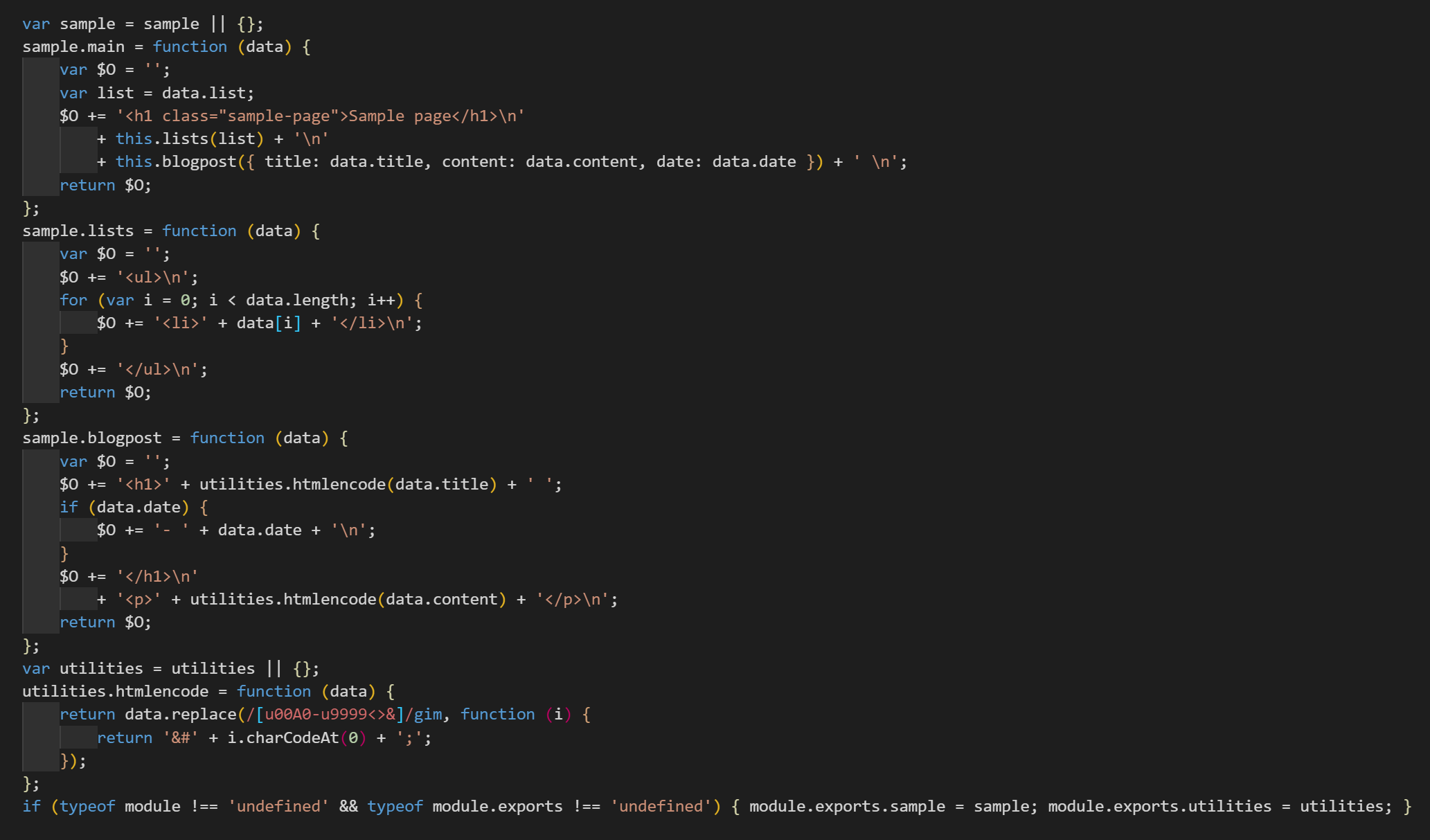
Quick Guide
Methods
Methodflave.transpile(flavestring, configuration)
Description
There is currently only one function exposed. It's first argument is the flave code and the second argument is the configuration. See further below for configuration options.
Example
const flave = require('../index.js');
const fs = require('fs');
const config = {
    format: false,
}
transpile('./sample/sample.flave', './sample/sample.js');

function transpile(src, dest) {
    fs.readFile(src, function (error, data) {
        if (!error)
            fs.writeFileSync(dest, flave.transpile(data.toString(), config))
    })
}
Configuration
quote string
Default:'
The quote type used around the HTML strings in the transpiled version.stripcomments boolean
Default:true
Remove comments fromviewandfunctionin final version.output string
Default:$O
Variable name that HTML strings are stored intotrim boolean
Default:trueTrim whitespace at the beginning of lines. Note: White space at the end is always removed.newlines boolean
Default:truePreserve new lines between HTML. If set to false new lines are replaced with a single space.format boolean
Default:true
Attempt to indent code generated.export boolean
Default:true
Addexport.modulescode at the end for use with Node.
Structure
Syntax
class classname{
    view viewname{

    }
    function functionname{

    }
}
Description
Wrapping everything in a class is optional, it allows to encapsulate methods under a namespace.
The view keyword defines a section that uses the flave syntax. The function keyword defines just that, a JavaScript function. Both view and function accept one argument, named data. See the screenshot above for an example.
Syntax
Variables
- Syntax
@( **JavaScriptCode** ) - Description
Use to insert dynamic text into the views. - Examples
<span>@(data.title)</span><a href="?query=@(encodeURIComponent(data.title))">Query</a>
Codeblocks
- Syntax
@{ **JavaScript Statements** } - Description
Use to insert raw JavaScript - Examples
@{var lists = data.split('\n')}@{ var lists = data.split('\n'); lists = lists .map((list) => list.trim()) .filter((list) => list) }
Iterators
- Syntax
@for(**Initialization**; **Condition**; **Final-expression**) Markup@while( **Condition** ){ Markup } - Description
These iterators map to JavaScript's iterators, so if works in JavaScript it should work here. Just like in Javascript, curly brackets are optional. - Examples
@for(var i = 0; i < data.imgs; i++)
    <img src="@(data.imgs[i])" />
@for(var key in data.list){ <li><b>@(key)</b> @(data[key])</li> }
Conditionals
- Syntax
@if( **Condition** ){ Markup } @else(**Condition){ Markup } @else{ Markup } - Description
Like iterators these all map to native JavaScript conditionals. Curly brackets are optional. - Examples
@if(typeof data == 'number'){
    <input type="number" value="@(data)"/>
}
@elseif(typeof data == 'string'){
    <input type="text" value="@(data)"/>
}@else
    <input type="text" disabled />
Comments
- Syntax
// Comment/* Comment Block */ - Description
Comment code - Examples
// Comment Line/* Multiline Comment Block */