
@thi.ng/color
v5.8.7
Published
Array-based color types, CSS parsing, conversions, transformations, declarative theme generation, gradients, presets

Maintainers
 thi.ng
Readme




[!NOTE] This is one of 212 standalone projects, maintained as part of the @thi.ng/umbrella monorepo and anti-framework.
🚀 Please help me to work full-time on these projects by sponsoring me on GitHub. Thank you! ❤️
For the Clojure version, please visit: thi.ng/color-clj
- About
- Status
- Support packages
- Related packages
- Installation
- Dependencies
- Usage examples
- API
- Authors
- License
About
Array-based color types, CSS parsing, conversions, transformations, declarative theme generation, gradients, presets.
Supported color spaces / modes
Fast color model/space conversions (any direction) between (in alphabetical order). All types support an alpha channel, which defaults to 100% opaque (apart from the integer types).
- ABGR (uint32,
0xaabbggrr, aka sRGB(A) as packed int) - ARGB (uint32,
0xaarrggbb, aka sRGB(A) as packed int) - CSS (string, hex3/4/6/8, named colors, system colors, rgba(), hsla(), lch(), lab(), etc.)
- HCY (float4, similar to LCH)
- HSI (float4)
- HSL (float4)
- HSV (float4)
- Lab (float4, D50/D65 versions)
- LCH (float4)
- Oklab (float4)
- Oklch (float4) (polar version of oklab)
- RGB (float4, linear)
- sRGB (float4, gamma corrected)
- XYY (float4)
- XYZ (float4, aka CIE 1931, D50/D65 versions)
- YCC (float4, aka YCbCr)
| From/To | CSS | HCY | HSI | HSL | HSV | Int | Lab | LCH | Oklab | Oklch | RGB | sRGB | XYY | XYZ | YCC | |-----------|-----------------|-----------------|-----------------|-----------------|-----------------|-----------------|-----------------|-----|-------|-------|-----------------|-----------------|-----|-----------------|-----------------| | CSS | ✅ | 🆎 | 🆎 | ✅ | 🆎 | ✅(1) | ✅(4) | ✅ | ✅ | ✅ | ✅ | ✅ | 🆎 | 🆎 | 🆎 | | HCY | 🆎 | ✅ | 🆎 | 🆎 | 🆎 | ❌ | 🆎 | 🆎 | 🆎 | 🆎 | ✅(2) | ✅(2) | 🆎 | 🆎 | 🆎 | | HSI | 🆎 | 🆎 | ✅ | 🆎 | 🆎 | ❌ | 🆎 | 🆎 | 🆎 | 🆎 | ✅(2) | ✅(2) | 🆎 | 🆎 | 🆎 | | HSL | ✅ | 🆎 | 🆎 | ✅ | 🆎 | ❌ | 🆎 | 🆎 | 🆎 | 🆎 | ✅(2) | ✅(2) | 🆎 | 🆎 | 🆎 | | HSV | 🆎 | 🆎 | 🆎 | ✅ | ✅ | ❌ | 🆎 | 🆎 | 🆎 | 🆎 | ✅(2) | ✅(2) | 🆎 | 🆎 | 🆎 | | Int | ✅ | 🆎 | 🆎 | 🆎 | 🆎 | ❌ | 🆎 | 🆎 | 🆎 | 🆎 | 🆎 | ✅ | ✅ | 🆎 | 🆎 | | Lab | ✅(5) | 🆎 | 🆎 | 🆎 | 🆎 | ❌ | ✅(3) | ✅ | 🆎 | 🆎 | ✅(3) | 🆎 | 🆎 | ✅(3) | 🆎 | | LCH | ✅(5) | 🆎 | 🆎 | 🆎 | 🆎 | ❌ | ✅ | ✅ | 🆎 | 🆎 | 🆎 | 🆎 | 🆎 | 🆎 | 🆎 | | Oklab | ✅(5) | 🆎 | 🆎 | 🆎 | 🆎 | ❌ | 🆎 | 🆎 | ✅ | ✅ | ✅ | 🆎 | 🆎 | ✅ | 🆎 | | Oklch | ✅(5) | 🆎 | 🆎 | 🆎 | 🆎 | ❌ | 🆎 | 🆎 | ✅ | ✅ | 🆎 | 🆎 | 🆎 | 🆎 | 🆎 | | RGB | 🆎 | ✅(2) | ✅(2) | ✅(2) | ✅(2) | ✅ | ✅(3) | ✅ | ✅ | 🆎 | ✅ | ✅ | 🆎 | ✅(3) | ✅(2) | | sRGB | ✅ | ✅(2) | ✅(2) | ✅(2) | ✅(2) | ✅ | 🆎 | 🆎 | 🆎 | 🆎 | ✅ | ✅ | 🆎 | 🆎 | 🆎 | | XYY | 🆎 | 🆎 | 🆎 | 🆎 | 🆎 | ❌ | 🆎 | 🆎 | 🆎 | 🆎 | 🆎 | 🆎 | ✅ | ✅ | 🆎 | | XYZ | 🆎 | 🆎 | 🆎 | 🆎 | 🆎 | ❌ | ✅ | 🆎 | 🆎 | 🆎 | ✅ | 🆎 | ✅ | ✅(3) | 🆎 | | YCC | 🆎 | 🆎 | 🆎 | 🆎 | 🆎 | ❌ | 🆎 | 🆎 | 🆎 | 🆎 | ✅(2) | 🆎 | 🆎 | 🆎 | ✅ |
- ✅ - direct conversion
- 🆎 - indirect conversion (mostly via RGB/sRGB)
- (1) - only via
parseHex() - (2) - no consideration for linear/gamma encoded RGB/sRGB (see Wikipedia)
- (3) - including D50/D65 illuminant options
- (4) - parsed as Lab w/ D50 illuminant as per CSS Color Module Level 4
- (5) - only if targeting CSS Color Module Level 4 or newer
Color creation / conversion
Each color type provides a factory function to create & convert color instances from other models/spaces. These functions can take the following arguments:
- CSS string
- number (interpreted as packed ARGB int32)
- array of color channel values (used as is)
- scalars (one per channel, alpha optional, always defaults to 1.0)
- color instance (might trigger conversion if needed)
Additionally, an optional target backing buffer, start index and stride can be given. See next section.
Some examples:
import { css, labD50, rgb, srgb } from "@thi.ng/color";

srgb("#ff0")
// $Color { offset: 0, stride: 1, buf: [ 1, 1, 0, 1 ] }

srgb(0x44ffff00)
// $Color { offset: 0, stride: 1, buf: [ 1, 1, 0, 0.26666666666666666 ] }

srgb(1,1,0)
// $Color { offset: 0, stride: 1, buf: [ 1, 1, 0, 1 ] }

srgb([0.1, 0.2, 0.3, 0.4])
// $Color { offset: 0, stride: 1, buf: [ 0.1, 0.2, 0.3, 0.4 ] }

// convert RGB CSS into Lab (D50)
labD50("#ff0")
// $Color {
//   offset: 0,
//   stride: 1,
//   buf: [ 0.9760712516622824, -0.1575287517691254, 0.9338847788323792, 1 ]
// }

// convert RGB CSS into Lab CSS (CSS Level 4 only)
css(labD50("#ff0"))
// 'lab(97.607% -15.753 93.388)'

// round trip:
// CSS -> sRGB -> lin RGB -> Lab -> lin RGB -> sRGB -> CSS
css(rgb(labD50("#ff0")))
// '#ffff00'
Additionally, colors can be created from black body temperatures
(kelvinRgb())
or wavelengths
(wavelengthXyz()).


Storage & memory mapping
All color types store their channel values in plain arrays, typed arrays of
(mostly) normalized values ([0,1] interval). Where applicable, the hue too is
stored in that range (similar to CSS
turn units), NOT in degrees.
Likewise, luminance is always stored in the [0,1] too, even for Lab, LCH where
often the [0,100] range is used instead.
As a fairly unique feature, all color types can be used to provided views of a backing memory buffer (e.g. for WASM/WebGL/WebGPU interop, pixel buffers etc.), incl. support for arbitrary component strides.
The lightweight class wrappers act similarly to the Vec2/3/4 wrappers in
@thi.ng/vectors,
support striding (for mapped memory views), named channel accessor
aliases (in addition to array indexing) and are fully compatible with
all vector functions.

import { Hue, css, namedHueRgb, rgb, srgb } from "@thi.ng/color";

const memory = new Float32Array(16);

// create RGBA color views of buffer: num, start index, strides
// here the colors are tightly packed w/o gaps in between
// (by default entire buffer is mapped, last 4 args are optional)
const colors = rgb.mapBuffer(memory, 4, 0, 1, 4);

// manipulating the colors, will directly manipulate the underlying buffer
namedHueRgb(colors[0], Hue.ORANGE);
namedHueRgb(colors[1], Hue.CHARTREUSE);
namedHueRgb(colors[2], Hue.SPRING_GREEN);
namedHueRgb(colors[3], Hue.AZURE);

memory
// Float32Array(16) [ 1, 0.5, 0, 1, 0.5, 1, 0, 1, 0, 1, 0.5, 1, 0, 0.5, 1, 1 ]

css(colors[0])
// '#ff8000'
css(colors[1])
// '#80ff00'
css(colors[2])
// '#00ff80'
css(colors[3])
// '#0080ff'

// use deref() to obtain a packed copy
colors[0].deref()
// [ 1, 0.5, 0, 1 ]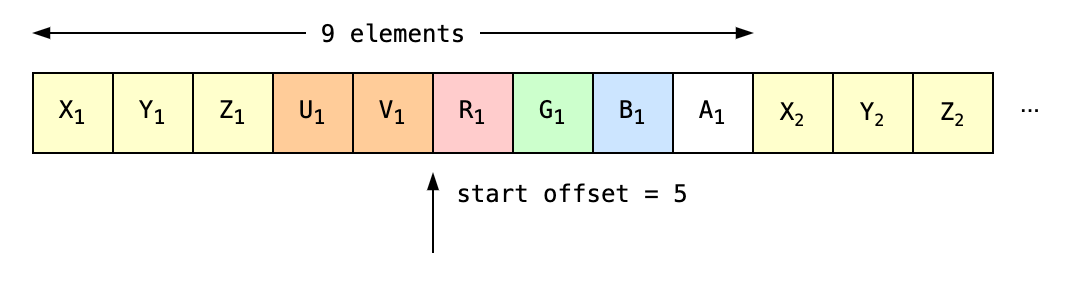
// here we create a *strided* WebGL attrib buffer for 3 points
// each point defines a: 3D position, UV coords and RGB(A) color
const attribs = new Float32Array([
  // pos     uv   color
  0,0,0,     0,0, 0.25,0.5,0,1,
  100,0,0,   1,0, 0.5,0.5,0.25,1,
  100,100,0, 1,1, 0,1,0.5,1,
]);

// create strided view of colors
// 3 items, start index 5, component stride 1, element stride 9
const colors2 = srgb.mapBuffer(attribs, 3, 5, 1, 9);

css(colors2[0])
// '#408000'
css(colors2[1])
// '#808040'
css(colors2[2])
// '#00ff80'
Color theme generation
The package provides several methods for declarative & probabilistic color theme generation. The latter relies on the concept of LCH color ranges, which can be sampled directly and/or mixed with a base color (of any type) to produce randomized variations. Furthermore, multiple such ranges can be combined into a weighted set to define probabilistic color themes.
import {
    COLOR_RANGES,
    colorFromRange,
    colorsFromRange,
    colorsFromTheme,
    hsv,
    lch,
} from "@thi.ng/color";

// single random color drawn from the "bright" color range preset
colorFromRange("bright");
// [ 0.7302125322518669, 0.8519945301256682, 0.8134374983367859, 1 ]

// single random color based on given raw HSV base color and preset
colorFromRange("warm", { base: hsv(0.33, 1, 1) });
// $Color {
//   offset: 0,
//   stride: 1,
//   buf: [ 0.774977122048776, 0.7432832945738063, 0.3186095419992927, 1 ]
// }

// infinite iterator of colors sampled from the preset
// (see table below)
const colors = colorsFromRange("bright");
colors.next();
// {
//   value: [ 0.006959075656347791, 0.8760165887192115, 0.912149937028727, 1 ],
//   done: false
// }

// 10 cool reds, w/ ±10% hue variance
[...colorsFromRange("cool", { num: 10, base: lch(1, 0.8, 0), variance: 0.1 })];

// generate colors based on given (weighted) textual description(s)
// here using named CSS colors, but could also be or typed colors or raw LCH tuples
[
    ...colorsFromTheme(
        [
            ["warm", "goldenrod"],
            ["cool", "springgreen", 0.1],
        ],
        { num: 100, variance: 0.05 }
    ),
];

// theme parts can also be given in the format used internally
// all keys are optional (range, base, weight),
// but at least `range` or `base` must be given...
[
    ...colorsFromTheme(
        [
            { range: "warm", base: "goldenrod" },
            { range: COLOR_RANGES.cool, base: hsv(0, 1, 0.5), weight: 0.1 },
        ],
        { num: 100, variance: 0.05 }
    ),
];
This table below shows three sets of sample swatches for each color range preset and the following color theme (raw samples and chunked & sorted):
- 1/3 goldenrod
- 1/3 turquoise
- 1/3 pink
- 1/6 black
- 1/6 gray
- 1/6 white
| ID | 100 colors drawn from color range preset |
|-----------|-----------------------------------------------------------------------------------------------------------------------------|
| bright |  |
| |
|
| |  |
| |
|
| |  |
|
|
| cool |  |
| |
|
| |  |
| |
|
| |  |
|
|
| dark |  |
| |
|
| |  |
| |
|
| |  |
|
|
| fresh |  |
| |
|
| |  |
| |
|
| |  |
|
|
| hard |  |
| |
|
| |  |
| |
|
| |  |
|
|
| intense |  |
| |
|
| |  |
| |
|
| |  |
|
|
| light |  |
| |
|
| |  |
| |
|
| |  |
|
|
| neutral |  |
| |
|
| |  |
| |
|
| |  |
|
|
| soft |  |
| |
|
| |  |
| |
|
| |  |
|
|
| warm |  |
| |
|
| |  |
| |
|
| |  |
|
|
| weak |  |
| |
|
| |  |
| |
|
| |  |
|
Full example:
import { colorsFromTheme, swatchesH, type ColorThemePartTuple } from "@thi.ng/color";
import { serialize } from "@thi.ng/hiccup";
import { svg } from "@thi.ng/hiccup-svg";
import { writeFileSync } "node:fs";

// color theme definition using:
// color range preset names, CSS colors and weights
const theme: ColorThemePartTuple[] = [
    ["cool", "goldenrod"],
    ["hard", "hotpink", 0.1],
    ["fresh", "springgreen", 0.1],
];

// generate 200 LCH colors based on above description
const colors = [...colorsFromTheme(theme, { num: 200, variance: 0.05 })];

// create SVG doc of color swatches (hiccup format)
const doc = svg(
    { width: 1000, height: 50, __convert: true },
    swatchesH(colors, 5, 50)
);

// serialize to SVG file
writeFileSync("swatches-ex01.svg", serialize(doc));
Color theme strategies
In addition to the above approaches to create color themes, the package also provides these more standard strategies to derive a color theme from a given base color (all configurable, examples shown here only use default params). These functions accept colors in any format, but computation and results are always in LCH.
Analog colors
import { analogStrategy, cssColors } from "@thi.ng/color";

console.log(cssColors(analogStrategy("#f60")));
// [ "#ff6600", "#ff2c63", "#c58f00" ]
Split-analog colors
import { splitAnalogStrategy, cssColors } from "@thi.ng/color";

console.log(cssColors(splitAnalogStrategy("#f60")));
// [ "#ff6600", "#00bcd4", "#00a6ff", "#c58f00" ]
Complementary colors
import { complementaryStrategy, cssColors } from "@thi.ng/color";

console.log(cssColors(complementaryStrategy("#f60")));
// [ "#ff6600", "#00b6ff" ]
Split-complementary colors
import { splitComplementaryStrategy, cssColors } from "@thi.ng/color";

console.log(cssColors(splitComplementaryStrategy("#f60")));
// [ "#ff6600", "#00bcd4", "#00a6ff" ]
Monochrome colors
import { monochromeStrategy, cssColors } from "@thi.ng/color";

console.log(cssColors(monochromeStrategy("#f60")));
// [ "#490000", "#880000", "#d44100", "#ff872d", "#ffce71" ]
Triadic colors
import { triadicStrategy, cssColors } from "@thi.ng/color";

console.log(cssColors(triadicStrategy("#f60")));
// [ "#ff6600", "#00bb7e", "#7f88ff" ]
Tetradic colors
import { tetradicStrategy, cssColors } from "@thi.ng/color";

console.log(cssColors(tetradicStrategy("#f60")));
// [ "#ff6600", "#75a800", "#00b6ff", "#7f88ff" ]
Color sorting & distance
The package provides several functions to compute full or channel-wise distances between colors. These functions can also be used for sorting color arrays (see below).
distChannel- single channel distance onlydistHsv/distHsvSat/distHsvLumadistEucledian3/distEucledian4distRgbLuma/distSrgbLumadistCIEDE2000distCMC
The sort() function
can be used to sort an array of colors using arbitrary sort criteria (basically
any function which can transform a color into a number). The following
comparators are bundled:
selectChannel(i)- sort by channelproximity(target, distFn)- sort by distance to target color using given distance functionluminance/luminanceRgb/luminanceSrgbetc.
import {
    colorsFromTheme,
    distCIEDE2000,
    lch,
    proximity,
    sort,
    type ColorThemePartTuple,
} from "@thi.ng/color";

// (theme from above example)
const theme: ColorThemePartTuple[] = [
    ["cool", "goldenrod"],
    ["hard", "hotpink", 0.1],
    ["fresh", "springgreen", 0.1],
];

const colors = [...colorsFromTheme(theme, { num: 200, variance: 0.05 })];

sort(colors, proximity(lch("#fff"), distCIEDE2000()));
Sorting memory-mapped colors
Memory mapped colors (e.g. a mapped pixel buffer) can be sorted (in place) via
sortMapped().
This function does NOT change the order of elements in the given colors array,
BUT instead sorts the apparent order by swapping the contents of the backing
memory.
See the pixel sorting example for a concrete use case...
import { css, luminanceSrgb, sortMapped, srgb } from "@thi.ng/color";

// memory buffer of 4 sRGB colors
const buf = new Float32Array([
    0, 1, 0, 1, 0, 0.5, 0, 1, 0, 0.25, 0, 1, 0, 0.75, 0, 1,
]);

// map buffer (creates 4 SRGB instances linked to the buffer)
const pix = srgb.mapBuffer(buf);

// display original order
console.log(pix.map((x) => css(x)));
// [ '#00ff00', '#008000', '#004000', '#00bf00' ]

// sort colors (buffer!) by luminance
sortMapped(pix, luminanceSrgb);

// new order
console.log(pix.map((x) => css(x)));
// [ '#004000', '#008000', '#00bf00', '#00ff00' ]

// buffer contents have been re-ordered
console.log(buf);
// Float32Array(16) [
//     0, 0.25, 0, 1,
//     0, 0.5, 0, 1,
//     0, 0.75, 0, 1,
//     0, 1, 0, 1
// ]
Gradients
The package provides several approaches, functions and presets to declaratively define color gradients and then sample them at user-defined resolutions to compute arrays of colors which can then be used for look-up purposes (e.g. mapping data values to colors).
Multi-stop gradients in any color space
The
multiColorGradient()
function can be used to generate gradients in any color space and gradient stops
must be using all the same color type. Colors are pairwise interpolated, and by
default, uses generic
mix() function which
delegates to type specific strategies. See
GradientOpts
for details.

import { lch, multiColorGradient, swatchesH } from "@thi.ng/color";
import { serialize } from "@thi.ng/hiccup";
import { svg } from "@thi.ng/hiccup-svg";
import { writeFileSync } "node:fs";

const L = 0.8;
const C = 0.8;

const gradient = multiColorGradient({
    num: 100,
    // gradient stops
    stops: [
        [0, lch(L, C, 0)],
        [1 / 3, lch(L, C, 1 / 3)],
        [2 / 3, lch(L, C, 2 / 3)],
        [1, lch(L, 0, 1)],
    ],
    // optionally with easing function
    // easing: (t) => t * t,
});

writeFileSync(
    "lch-gradient.svg",
    serialize(
        svg(
            { width: 500, height: 50, __convert: true },
            swatchesH(gradient, 5, 50)
        )
    )
);
Cosine gradients
The following presets are bundled (in cosine-gradients.ts):
| Preview | Gradient ID |
|-----------------------------------------------------------------------------------------------------------------------------------------------|-------------------------|
|  |
| blue-cyan |
|  |
| blue-magenta-orange |
|  |
| blue-white-red |
|  |
| cyan-magenta |
|  |
| green-blue-orange |
|  |
| green-cyan |
|  |
| green-magenta |
|  |
| green-red |
|  |
| heat1 |
|  |
| magenta-green |
|  |
| orange-blue |
|  |
| orange-magenta-blue |
|  |
| purple-orange-cyan |
|  |
| rainbow1 |
|  |
| rainbow2 |
|  |
| rainbow3 |
|  |
| rainbow4 |
|  |
| red-blue |
|  |
| yellow-green-blue |
|  |
| yellow-magenta-cyan |
|  |
| yellow-purple-magenta |
|  |
| yellow-red |
Two-color cosine gradients
The
cosineCoeffs()
function can be used to compute the cosine gradient coefficients between 2
start/end colors:
import { css, cosineCoeffs, cosineGradient } from "@thi.ng/color";

// compute gradient coeffs between red / green
console.log(
    cosineGradient(10, cosineCoeffs([1, 0, 1, 1], [0, 1, 0, 1])).map((x) => css(x))
);
// '#ff00ff'
// '#f708f7'
// '#e11ee1'
// '#bf40bf'
// '#966996'
// '#699669'
// '#40bf40'
// '#1ee11e'
// '#08f708'
// '#00ff00'
Multi-stop gradients
The
multiCosineGradient()
function returns an iterator of raw RGB colors based on given gradient stops.
This iterator computes a cosine gradient between each color stop and yields a
sequence of RGB values.
import { css, multiCosineGradient, srgb } from "@thi.ng/color";

const gradient = multiCosineGradient({
    num: 10,
    // gradient stops (normalized positions)
    stops: [
        [0.1, [1, 0, 0, 1]],
        [0.5, [0, 1, 0, 1]],
        [0.9, [0, 0, 1, 1]],
    ],
    // optional color transform/coercion
    tx: srgb
});

console.log(gradient);
// [
// 	[1, 0, 0, 1],
// 	[1, 0, 0, 1],
// 	[0.854, 0.146, 0, 1],
// 	[0.5, 0.5, 0, 1],
// 	[0.146, 0.854, 0, 1],
// 	[0, 1, 0, 1],
// 	[0, 0.854, 0.146, 1],
// 	[0, 0.5, 0.5, 1],
// 	[0, 0.146, 0.853, 1],
// 	[0, 0, 1, 1],
// 	[0, 0, 1, 1]
// ]

// convert to CSS
console.log(gradient.map((x) => css(x)));
// [
//   "#ff0000",
//   "#ff0000",
//   "#da2500",
//   "#807f00",
//   "#25da00",
//   "#00ff00",
//   "#00da25",
//   "#00807f",
//   "#0025da",
//   "#0000ff",
//   "#0000ff",
// ]
RGB color transformations
RGB color matrix transformations, including parametric preset transforms:
- brightness
- contrast
- exposure
- saturation (luminance aware)
- hue rotation
- color temperature (warm / cold)
- sepia (w/ fade amount)
- tint (green / magenta)
- grayscale (luminance aware)
- subtraction/inversion (also available as non-matrix op)
- luminance to alpha
Transformation matrices can be combined using matrix multiplication /
concatenation (see
concat()) for more
efficient application.
Status
STABLE - used in production
Search or submit any issues for this package
Support packages
- @thi.ng/color-palettes - Collection of 200+ image based color themes & composable theme query filters
Related packages
- @thi.ng/pixel - Typedarray integer & float pixel buffers w/ customizable formats, blitting, drawing, convolution
- @thi.ng/vectors - Optimized 2d/3d/4d and arbitrary length vector operations, support for memory mapping/layouts
Installation
yarn add @thi.ng/colorESM import:
import * as color from "@thi.ng/color";Browser ESM import:
<script type="module" src="https://esm.run/@thi.ng/color"></script>For Node.js REPL:
const color = await import("@thi.ng/color");Package sizes (brotli'd, pre-treeshake): ESM: 15.84 KB
Dependencies
- @thi.ng/api
- @thi.ng/arrays
- @thi.ng/binary
- @thi.ng/checks
- @thi.ng/compare
- @thi.ng/compose
- @thi.ng/defmulti
- @thi.ng/errors
- @thi.ng/math
- @thi.ng/random
- @thi.ng/strings
- @thi.ng/transducers
- @thi.ng/vectors
Note: @thi.ng/api is in most cases a type-only import (not used at runtime)
Usage examples
28 projects in this repo's /examples directory are using this package:
| Screenshot | Description | Live demo | Source | |:-------------------------------------------------------------------------------------------------------------------------------------|:---------------------------------------------------------------------------------|:-------------------------------------------------------------|:------------------------------------------------------------------------------------------| | | Basic 2D boid simulation and spatial indexing neighbor lookups | Demo | Source | | | Tool to interactively compute & visualize color contrasts against WCAG threshold | Demo | Source | | | Probabilistic color theme generator | Demo | Source | | | Heatmap visualization of this mono-repo's commits | | Source | | | Color palette generation via dominant color extraction from uploaded images | Demo | Source | | | Fiber-based cooperative multitasking basics | Demo | Source | | | Shape conversions & operations using polygons with holes | Demo | Source | | | Piechart visualization of CSV data | Demo | Source | | | Iterating the unique edges of a tessellation | Demo | Source | | | Augmenting thi.ng/geom shapes for WebGL, using instancing & attribute buffers | Demo | Source | | | Converting thi.ng/geom shape types for WebGL | Demo | Source | | | Visualization of different grid iterator strategies | Demo | Source | | | Various hdom-canvas shape drawing examples & SVG conversion / export | Demo | Source | | | Basic hiccup-based canvas drawing | Demo | Source | | | k-means clustering visualization | Demo | Source | | | Matrix-based image color adjustments | Demo | Source | | | Randomized 4-point 2D color gradient image generator | Demo | Source | | | Image dithering and remapping using indexed palettes | Demo | Source | | | Interactive pixel sorting tool using thi.ng/color & thi.ng/pixel | Demo | Source | | | Animated, iterative polygon subdivisions & visualization | Demo | Source | | | Animated SVG elements with reactive attributes | Demo | Source | | | Fork-join worker-based raymarch renderer (JS/CPU only) | Demo | Source | | | Fitting, transforming & plotting 10k data points per frame using SIMD | Demo | Source | | | Responsive & reactively computed stacked column layout | Demo | Source | | | Multi-layer vectorization & dithering of bitmap images | Demo | Source | | | Animated t-SNE visualization of 4D data | Demo | Source | | | Interactive ridge-line plot | Demo | Source | | | Interactively drawing to & reading from a WebGL offscreen render texture | Demo | Source |
API
Authors
If this project contributes to an academic publication, please cite it as:
@misc{thing-color,
  title = "@thi.ng/color",
  author = "Karsten Schmidt",
  note = "https://thi.ng/color",
  year = 2016
}
License
© 2016 - 2025 Karsten Schmidt // Apache License 2.0