
@alicloud/opentracing
v0.1.1
Published
[](https://badge.fury.io/js/@alicloud%2fopentracing.svg) [](https://travis-ci.org/aliyun-node/opentracing)


Keywords
Readme
Node.js 性能平台 - 慢链路追踪



@alicloud/opentracing 是 alinode 团队开发的慢链路追踪日志输出模块,配合 Node.js 性能平台 可以展示您的 web 应用中抓取到的慢请求的产生原因。
安装
$ npm install @alicloud/opentracing使用
公共类: Tracer(name[, option][, reporter]):
I. 参数:
- name String - tracer 的名称
- option Object - 可选
- limit Number - 每分钟限制记录落盘的数据条数限制,防止大量异常的情况下大量日志写入文件造成磁盘溢出
- logger Object - 日志句柄,最小需要实现 info、log、warn 和 error 方法,默认采用 console
- reporter Object - 自定义发送方法,需要实现 report 方法,入参为 span
II. 成员方法:startSpan(spanName[, option])
- spanName String - span 的名称,用来标记此 span 下的异步调用
- option Object - 可选
- childOf Object - 传入当前 span 的父级 span 实例
- 返回值 Object - 返回内置的类 Span 的实例
内置类:Span
I. 成员方法:setTag(tag, value)
- tag String - Tag 名称,可以自定义,一般从 opentracing.Tags 中获取(里面定义了常见的 host、url、statusCode 等链路信息 Key)
- value String - Tag 名称对应的值
II. 成员方法:log(key, value)
- key String - 自定义的日志键
- value String - 自定义的日志值
III. 成员方法: finish(req)
- req Object - http 请求的 request 对象
例子
下面是一个嵌入 express 应用的使用完整样例,模拟了并发的异步耗时调用,和顺序的异步耗时调用:
'use strict';
const express = require('express');
const app = express();
const opentracing = require('@alicloud/opentracing');
const tracer = new opentracing.Tracer('测试链路');

// 模拟耗时的异步操作
function delay(time, req) {
  let child = tracer.startSpan('子模块 1: 随机并发延迟', { childOf: req.parentSpan });
  child.setTag('timeout', time);
  child.log({ state: 'timer1' });
  return new Promise((resolve, reject) => {
    setTimeout(() => {
      resolve();
      child.finish(req);
    }, time);
  });
}

// 在所有中间件之前,开启一个根 span,记录下 hostname、method、url,以及收到 end 事件后的
app.use(function (req, res, next) {
  req.parentSpan = tracer.startSpan('根模块');
  req.parentSpan.setTag(opentracing.Tags.PEER_HOSTNAME, req.hostname);
  req.parentSpan.setTag(opentracing.Tags.HTTP_METHOD, req.method.toUpperCase());
  req.parentSpan.setTag(opentracing.Tags.HTTP_URL, req.url);
  next();
  res.once('finish', () => {
    req.parentSpan.setTag(opentracing.Tags.HTTP_STATUS_CODE, res.statusCode);
    req.parentSpan.finish(req);
  });
});

// 模拟并发的耗时异步操作
app.use(function (req, res, next) {
  Promise.all([
    delay(Math.random() * 10 * 1000, req),
    delay(Math.random() * 10 * 1000, req)
  ]).then(() => next());
});

// 继续模拟一个顺序的 3s 耗时异步操作
app.use(function (req, res, next) {
  let child = tracer.startSpan('子模块 2: 延迟 3s', { childOf: req.parentSpan });
  child.setTag('timeout', '3s');
  child.log({ state: 'timer2' });
  // 3s call
  setTimeout(() => {
    child.finish(req);
    next()
  }, 3000);
});

// 响应页面
app.get('*', function (req, res) {
  res.send('Hello Node.js Performance Platform!');
});

app.listen(3000);
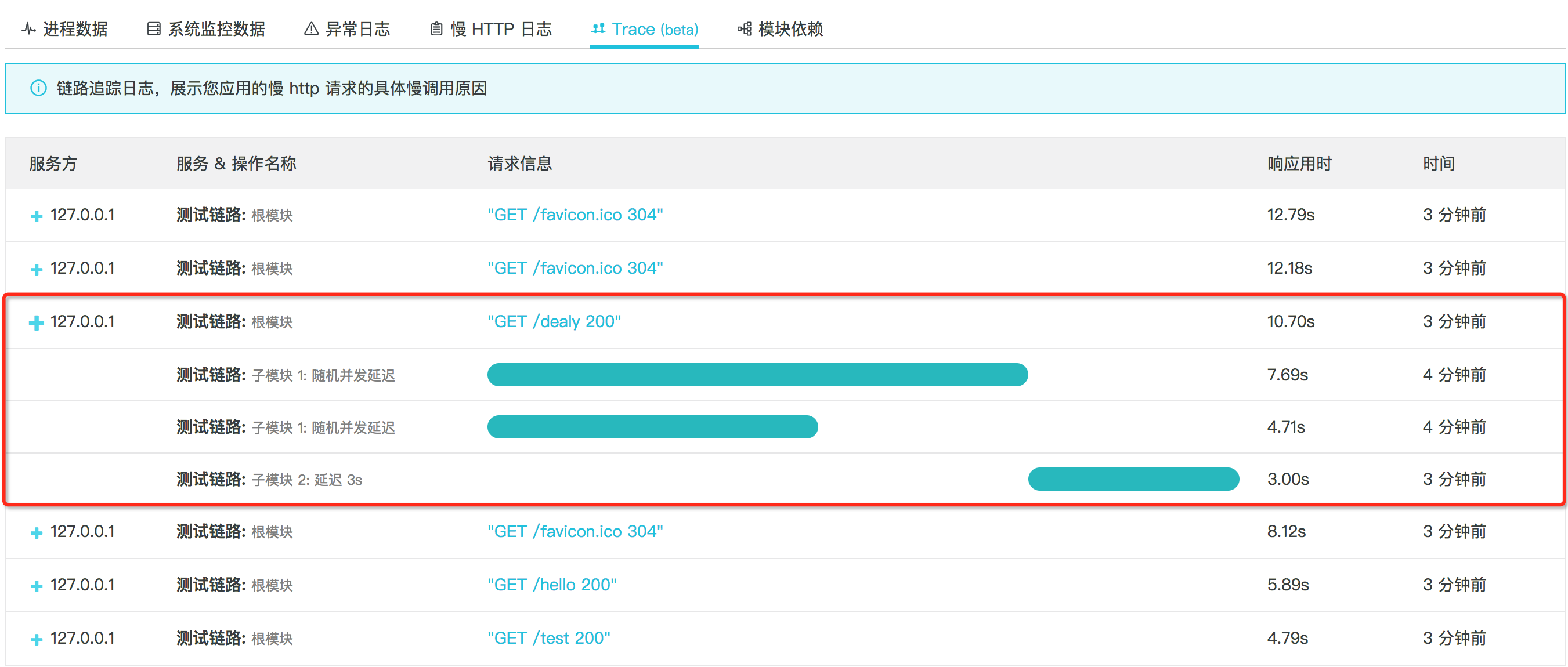
等待约 1min 后,可以在控制台的相应 Tab 页看到:
联系我们
所有使用中遇到的问题,请咨询钉钉群:11794270。